
- Zephyr Workspace and Project Directory
- Zephyr Board Directory
- Zephyr Application Directory
- Zephyr Build Directory
Zephyr is an open-source, scalable, and secure real-time operating system (RTOS) designed for modern embedded and connected devices. It supports a wide range of hardware platforms, from small resource-constrained microcontrollers to more capable edge-computing systems.
- Kernel: It manages threads, scheduling, interrupts, synchronization, timing, and other system resources.
- Multithreading: Allows multiple threads to execute concurrently, enabling applications to handle several operations while maintaining responsiveness and real-time behavior.
- Memory Management: Provides mechanisms for efficient and predictable use of limited memory, including dynamic allocation, memory pools, stacks, and memory protection.
A Zephyr application is more than a set of source files. It exists within a structured workspace, integrates with a multi-stage build system, and depends on multiple repositories working together. In practice, developers often need to set up a workspace, organize application code, and manage dependencies while ensuring that builds remain reproducible across environments.
A West workspace is identified by the presence of the .west/ directory at its root. When a West command runs, it searches upward in the directory tree until it finds this directory, then performs all operations relative to that workspace root. Inside the workspace, multiple repositories coexist, including the Zephyr repository, which contains the kernel, subsystems, drivers, and build system. Applications are typically placed alongside the Zephyr repository rather than inside it, and a workspace may contain one or many applications.
A Zephyr workspace is defined by a manifest file that specifies which repositories are used, where they are fetched from, and how they are organized locally. The West manifest is a YAML file named west.yml. It describes the repositories (called projects in West terminology) that belong to a workspace. The manifest may live in different locations depending on the chosen workspace topology, but its purpose remains the same: to define the composition of the workspace.
- arch/: CPU architecture support
- boards/: Board definitions, Devicetree, Kconfig, and default settings
- cmake/: CMake build-system modules
- drivers/: Hardware drivers: GPIO, I2C, SPI, UART, ADC, sensors, etc
- include/: Public Zephyr API headers
- kernel/: Kernel: scheduler, threads, synchronization, timers
- samples/: Example and reference applications
- scripts/: Build, configuration, flashing, testing, and helper tools
- soc/: Vendor- and SoC-specific support
- subsys/: System services: logging, shell, networking, settings, etc
- tests/: Kernel, driver, subsystem, and API tests
- west.yml: Defines which repositories West uses and where to find them
zephyr-sdk-<version>/

zephyr_workspace/
     ├── .venv/
     └── .west/
           └── config
     └── bootloader/
           └── mcuboot/
     └── modules/
           └── hal/
                ├── cmsis/
                └── stm32/
           └── lib/
                ├──cmsis-dsp/
                └──cmsis-nn/
           └── fs/
                ├── fatfs/
                └── littlefs/
     └── zephyr/
           ├── arch/
           ├── boards/
           ├── cmake/
           ├── drivers/
           ├── include/
           ├── kernel/
           ├── samples/
           ├── scripts/
           ├── soc/
           ├── subsys/
           ├── tests/
           └── west.yml
     ├── tools/
     └── apps/
          ├── project_1
          └── project_2
     └── build/
          ├── project_1
          └── project_2
- Kconfig.<board_name>: Defines board- and SoC-related Kconfig settings
- <board_name>_defconfig: Defines default Kconfig options for the board
- <board_name>.dts: Describes the board’s hardware using Devicetree
- <board_name>.yaml: Defines board metadata and capabilities for automated testing
- board.cmake: Configures runners for flashing and debugging
- board.yml: Defines board identity, SoC, revisions, and variants
└── zephyr/
      └── boards/
            └── vendor/
                  └── <board_name>/
                          ├── Kconfig.<board_name>
                          ├── <board_name>_defconfig
                          ├── <board_name>.dts
                          ├── <board_name>.yaml
                          ├── board.cmake
                          └── board.yml
- CMakeLists.txt: Connects the project to Zephyr’s build system
- Kconfig: Defines application options, their types, defaults, and dependencies
- prj.conf: Configures application, Zephyr, and module features by setting option values
- extra.conf: Optional Kconfig configuration fragment used to add or override settings in prj.conf for a particular build
- <board_name>.conf: Board-specific Kconfig settings
- <board_name>.overlay: Board-specific Devicetree hardware changes
└── apps/
      └── project_1
             ├── CMakeLists.txt
             ├── Kconfig
             ├── prj.conf
             ├── extra_1.conf
             ├── extra_2.conf
             ├── app.overlay
             └── boards/
                  ├── <board_name_1>.conf
                  ├── <board_name_1>.overlay
                  ├── <board_name_2>.conf
                  └── <board_name_2>.overlay
             └── src/
└── main.cA Zephyr application goes through multiple build stages before producing the final executable. A pristine build removes the existing build directory before starting a new build. This forces CMake, Kconfig, and Devicetree to run from scratch instead of reusing cached results.
- .conf: The final resolved Kconfig configuration for the current build
- autoconf.h: The C header generated from .config so the selected Kconfig options can be used by C/C++ source code.
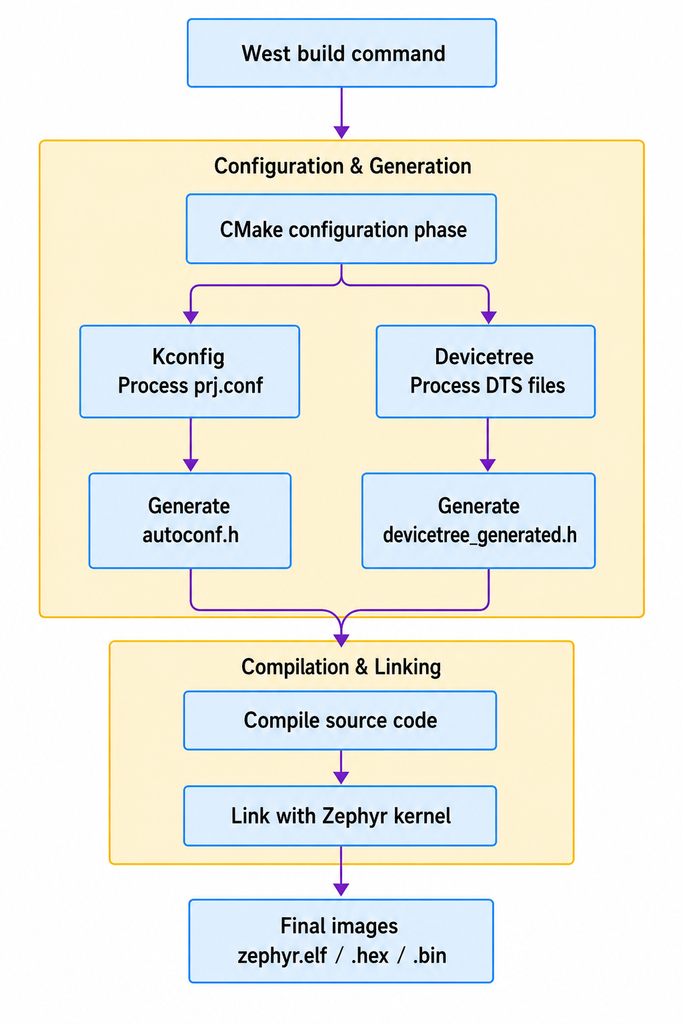
└── build/
      └── project_1
              └── zephyr/
                    ├── zephyr.elf
                    ├── zephyr.hex
                    ├── zephyr.bin
                    ├── zephyr.map
                    ├── zephyr.dts (merged Devicetree output)
                    ├── .config
                    └── include/generated/zephyr/
                            ├── autoconf.h (Kconfig output)
                            └── devicetree_generated.h (Devicetree macros)
[1] Zephyr Project Documentation
[2] Zephyr API Reference
[3] Samples and Demos
[4] Supported Boards and Shields
[5] Zephyr Workspace
[6] Zephyr Application Development
[7] Zephyr Build and Configuration Systems
[8] Zephyr Build System (CMake)
[9] West Manifests
Back to top of the page